Supporting System and Browser:
For visitors, LR realizes the support of various browsers and operating system. It supports WIN9X, WINNT/2000, WINXP/2003, WINVISTA, UNIX/LINUX/BSD, and browsers such as Mac, and IE4+, NS4.x, NS6.x, Mozilla, Opera7 and Galeon are supported. Any visitor can have a dialogue through LR system.
The Unified Preserve of History Records:
The statistics and back up of dialogue history record can not be deleted by any receptionist. It can be used as a stable customer serivce record. It can be inquired directly, or be exported for classification, statistics and analysis. It can be used to prevent the customer services from personal chatting in working hours, and to supervise the dialogue of receptionists, as well as helping them to form a service standard to level up their services.
The manager can supervise all the real-time dialogues of employees:
when several administrators are on line at the same time, the real-time supervision can be carried out according to different privilege levels of them.
Real-time Monitoring of Websites Visitors:
The system can see and monitor all the visitors on the web and show their details, including visiting statistics.
Initiative Invitation:
The LR has four ways to invite a customer. They are Custom invitation, quick invitation, direct dialogue and auto invitation. They are all helpful for you to contact any potential buyer on your website. When you have a understand of the visitor's need by knowing his visiting tracks, you can invite hom initially for a chat on your website.
Identification of Source of Customer:
The LR system can find out the search engine and key words, by which the customer finds your website. And friendly links or advertisement links to your website can also be identified.
Identification of VIP:
If the source website has a VIP system, the system can identify the visitor if visitor’s is a member.
Perfection and Stability:
There are a lot of details showing the perfection and stability of LR. For example, when we are setting “enter” as the shortcut key of sending, we can still use “Ctrl + Enter” for a newline.
Efficient Reception:
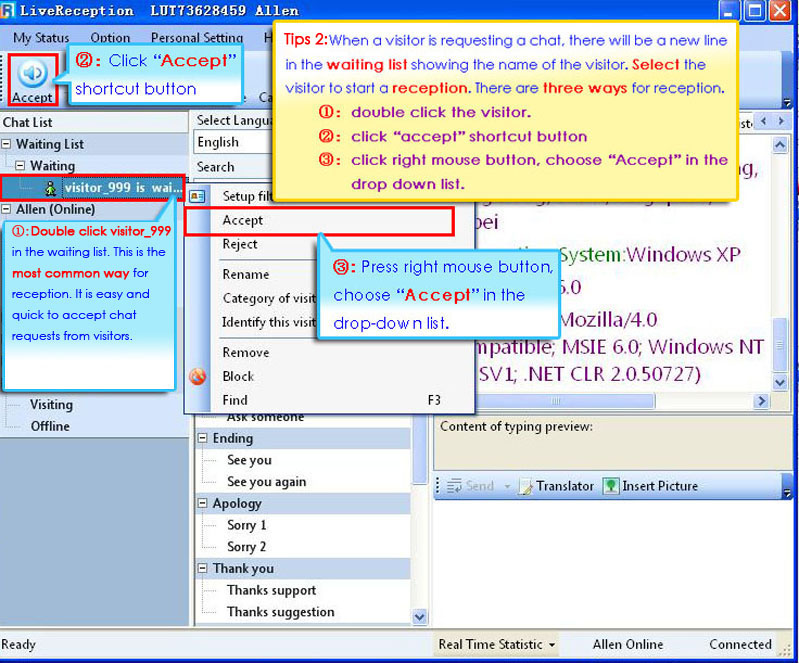
Take MSN and ICQ for example. When a receptionist serves one dialogue he needs to open one chat window; then if he serves 30 dialogues simultaneously, there are 30 dialogue windows. It is complex and passive for the receptionist. While LR integrates all dialogues in one operating interface efficiently. And there are many ways to rank the dialogues. Then every visitor could be served well.
Powerful Quick Reply:
At present the quick reply of LR enjoys best and most powerful function among likewise products. Shortcut keys can be used to send regular replies. And there are various ways to filter, rank and search.
Document Transmission:
Under the circumstance of lacking any browser plug-in, LR has the function of mutual document transmission. Visitors and operator, as well as internal staff, can enjoy this stable and convenient document transmission. It also supports sending print screens.
Visiting Tracks:
The real-time visiting tracks of the on-line visitors can help the operator to know more about the visitor’s trend. And it also helps to optimize your website process. By some easy settings, the operator can mark the visitor’s track with some friendly names.
Professional Management Interface:
There are six statuses of on-line visitors: visiting, inviting, waiting, chatting, transferring, offline. Every customer service has the same working layout showing his working status: how many guests are chatting? How many guests are being invited? How many chats are closed? How many dialogues are being transferred to other departments for further supports? In this way, the operators and managers can all have a unique view to the visiting guest. So they can observe and serve the guest who is visiting your website. LR has a visualized customer interface, which can make the customer services feeling comfortable and relax. Then they can concentrate their attention on solving the guest’s problem better.
Permanent Identification:
LR can identify the guests permanently for long term communication. When a guest visit your website next time (his lat visit was 5 or 6 weeks ago, or longer), LR will automatically callout the altered name that the customer service marked for the guest, and all the records of historical dialogues to follow up the customer.
For the circumstance of malicious harassment and word attack to the customer service, LR provides the function of blocking visitor. The operator can block the visitor to protect the customer service from being harassed.
The Contact Center in the Website: The system can group, classify and filter the visitors by different services or departments. And receptionists can transfer the dialogues to each other, like a group call system. And the efficiency of reception can be improved obviously.
Working with CRM:
Live Reception works well with CRM system to manage the customer relationship perfectly.
Has a Preview on Visitor’s Inputting:
The receptionist has a preview on the visitor’s imputing. This function can help the receptionist operator to know about the visitor’s mind better. The function helps to improve the efficiency and quality of receptionists’ reply, too.
Language Support:
Now the Live Reception system supports simplified Chinese, traditional Chinese, English, Japanese and Korean. And we are developing more language versions. It is becoming an important weapon in the field of imp & exp on-line negotiations.
E-mail Marketing:
Add your Live Reception in your business E-mail. And your client can contact you with the live chat in the mail directly. And this function can help to establish a better sales performance.
Editions:
We can provide Live Reception of server edition, which can be installed on your own server. Security, network speed and stability are all under your control. Pay one time for this edition and you can use it forever. And we have the standard edition, which needs to be renewed yearly.
SSL128 Encrypted Data:
The data of chats is SSL 128 encrypted, and all the data will be kept in our SSL dedicated server. And we will assure you in the formal contract that your temporary or permanent chat data will be kept perfectly without any breach.
Data Processing and Mining:
Live Reception provides several kinds of data statistics. The user can export the statistical form according to his needs. There are more than ten ways to lookup. The user can find the data he needs easily. The server will backup the data, you don’t need to worry about that.
Software Backup:
Live Reception provides safe and easy database backup system. The system can keep all the settings and records under the circumstance of movement of websites and server.
Hardware backup:
Our server has Raid1 automatic backup system to insure that the data will not lost when hardware malfunction occurs.
Update Time:
The update time is in the early morning. Updating doesn’t effect the use.
Function Update:
We have been focusing on the advices of customers, and we have a professional tech team to provide the update service.
Update Charge:
The user of standard edition does not need to pay for extra update charge.